Powerful Financial Document Processing Software for Invoices & Receipts
Explore DocuNero’s powerful financial document processing software features designed to automate invoice and receipt processing, document extraction, approvals, analytics, and exports using AI.
AI-Powered Document Extraction
Extract structured data instantly from invoices, receipts, scanned PDFs, and multi-page documents using AI-powered document extraction. Save time on manual data entry and improve accuracy with intelligent OCR technology. Learn more about how DocuNero automates accounts payable with our AI invoice processing features.
- Detects: Vendor, Date, Total, Subtotal, Tax, Currency and Category
- Reads low-quality scans and camera photos
- Processes multipage statements
- Extracts full line items
- Works with PDFs, images, and scanned documents
Bulk Uploads & Batch Processing
Upload documents in a single batch. Review, approve, and export everything together. Ideal for accountants, bookkeepers, and teams managing high volumes of invoices and receipts through batch document processing.
- Upload upto 10 documents at once for now
- Batch-level analytics
- Automatic document grouping
- Track processing time and OCR accuracy
- Approval state overview
Smart Categorization
DocuNero automatically identifies spending categories such as Travel, Food, Utilities, Supplies, and more. Save hours of manual classification and ensure consistent reporting. DocuNero also simplifies expense tracking with powerful AI receipt processing workflows.
- Auto-detects common business categories
- Learns from user behavior over time
- Works across currencies
Team Management & Roles
Invite your entire team and assign clear roles with granular permissions. Ensure secure access to documents, approvals, and exports.
- Owner, Admin, Member, Uploader, Viewer roles
- Role-based access to uploads, approvals, analytics
- Activity logs
- Safe multi-user collaboration
Smart Approval Workflow
Maintain control over financial data with a streamlined, transparent approval workflow.
- Auto-approved for Admin/Owner uploads
- Manual review for member-uploaded documents
- Track who approved and when
- Ensures compliance and accuracy
- Audit-friendly
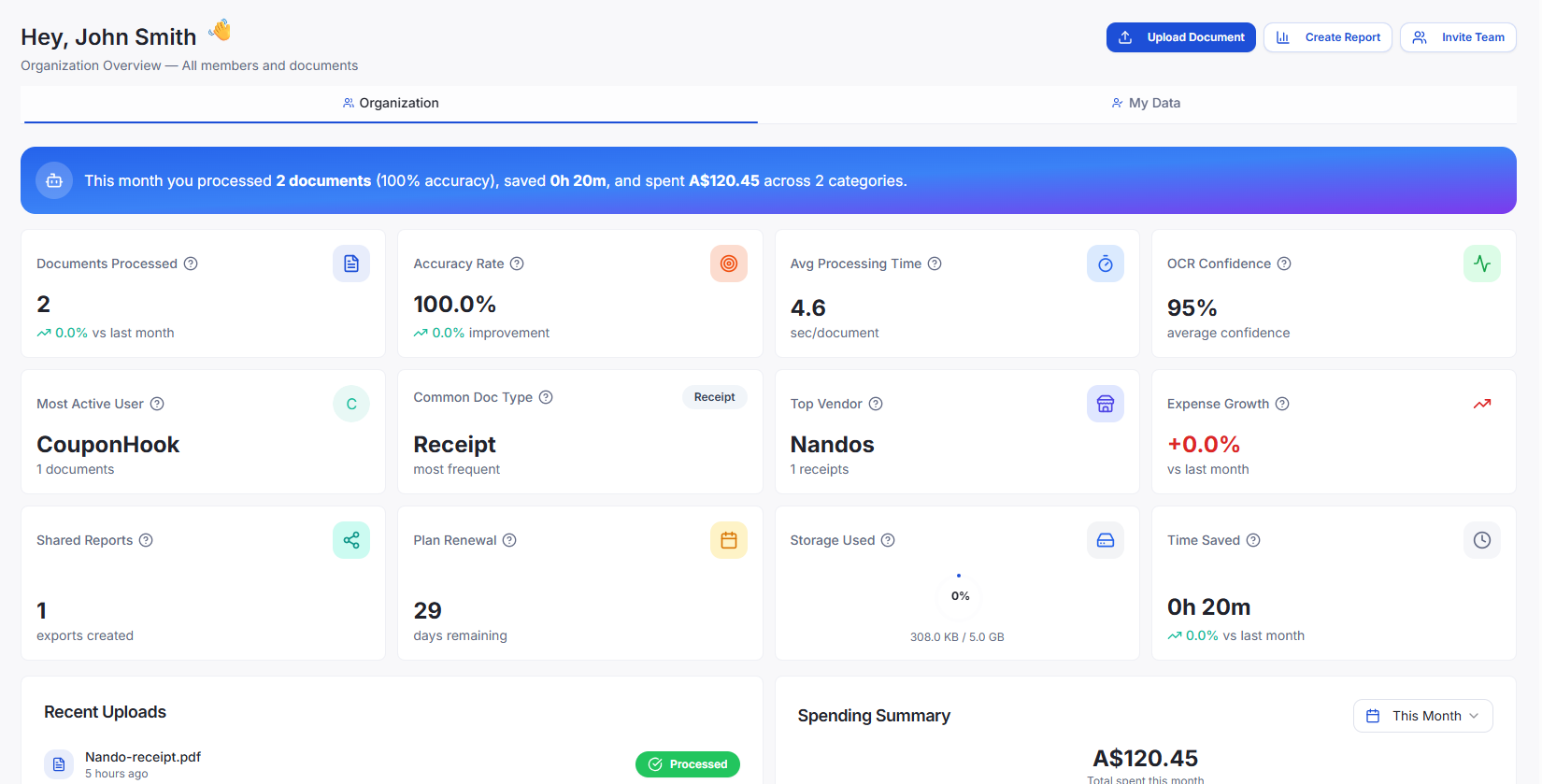
Dashboard & Analytics
Get a complete view of your financial processing activity. Identify spending patterns, vendor trends, and document quality insights at a glance.
- Total spend overview
- Category-wise and vendor-wise analytics
- OCR confidence monitoring
- Processing time insights
- Monthly trends and batch summaries
Export in Any Format
Export clean, structured invoice and receipt data generated by the document processing workflow.
- Excel (.xlsx)
- CSV
- JSON
- PDF report
- Includes line items, totals, and batch summaries
Built-In Support Ticket System
Let your team raise and track support issues directly through the platform. Keep everything centralized and easy to manage.
- Create and assign tickets
- Track status & priority
- User-wide visibility
Get Started for Free
Sign up and explore DocuNero with our Free Plan. No credit card required.
See our pricing plans to choose the best option for your document processing needs.
Start Free — No Credit Card Required